Many teams run into the same problem: their CI pipeline or release processmust run on macOS, but purchasing Macs, setting up a datacenter, or giving every team member a physical machine is costly and operationally complex. vpszap's approach is straightforward: puta dedicated physical Mac mini (M4 / M4 Pro)in a data center close to you, giving youSSH and VNCaccess within minutes — billed daily, weekly, monthly, or quarterly, with no long-term contract. This article consolidates the official site's content into a readable long-form guide, so you can clearly explain "what we chose for our cloud Mac" in reviews or internal discussions.

1. What vpszap Offers
At the core is100% dedicated physical hardware: no virtualization or resource sharing — the entire Mac mini's CPU, memory, SSD, and GPU are dedicated to your instance. Available models include theMac mini M4 (e.g., 16GB / 256GB)andand the higher-spec M4 Pro(larger memory and storage, with optional SSD expansion). After activation, you have both CLI and GUI access — ideal for teams that need to runxcodebuildand Fastlane, while also needing occasional GUI access for debugging or simulators.
2. Typical Use Cases: Who Should Try It First
iOS / macOS builds and releases: CI pipelines need a stable Xcode version and sufficient disk — a dedicated machine prevents neighbor tasks from saturating disk I/O.CI/CD and automation: connect the Mac as a build node to your existing pipeline; SSH integration with scripts and self-hosted runners works seamlessly.Remote development requiring low-latency access: use tools like VS Code Remote SSH to anchor your environment to a node close to your business or users. The site also mentionsThunderbolt 5 Interconnectand other expansion capabilities. Teams with large-scale parallel or clustering needs should confirm the exact solution scope with sales/support.
3. Nodes & Networking: Stay Close to Your Users
vpszap has nodes inSingapore, Japan (Tokyo), Korea (Seoul), Hong Kong, and US West(see the console for the current list of available regions). The site highlightsdedicated IPsand1Gbps bandwidth, and latency optimization. When selecting a region, choose the one closest to your team or end users, then run a real pipeline to benchmark build and artifact pull times — that's more reliable than reading a price list.


4. From Order to Connection: Three Steps
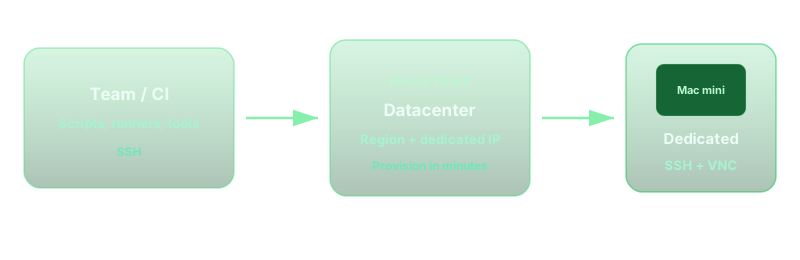
Consistent with the homepage "3-step quick start":1)Select your machine type, node, and billing cycle on the configuration page;2)Complete payment (credit card and common local payment methods supported — see checkout for details);3)Once automated provisioning is complete,within ~5 minutesyou'll receive SSH/VNC credentials by email and can connect immediately. Day-to-day management is done throughConsole; for detailed operation instructions and troubleshooting, seeHelp Center.

5. Billing & Add-ons: No Long-Term Contract, Flexible Cycles
Plans are billed byday, week, month, or quarter. The site emphasizesno contracts and no hidden auto-renewal tricks(see the order page for details); higher-spec machines can be paired withSSD expansionand other add-ons. Prices and promotions may change over time — always refer to thepricing pageand the real-time order page for the latest figures. This article aligns you on value proposition — it doesn't replace your billing summary.
6. Pre-Purchase Checklist (Go Through This With Your Team)
Before creating an account, run through these points to align expectations and avoid discovering missing prerequisites after you're already in the cloud.
- Are theminimum Xcode / macOS versionsrequired by your build pipeline already aligned with the current image or provisioning policy?
- Where are your primary users located? Have you selected a node withacceptable latency?
- Is your pipeline pure CLI, or does itrequire a VNC GUI? Does your network policy allow VNC/SSH outbound traffic?
- Artifact and dependency size: is the default disk sufficient, or do you need to add an SSD expansion?
The developer blog will follow up withhands-on build guides, networking and security, and integrations with common CI platformsand other topics. If you're new to vpszap, we recommend opening thehomepageto review the feature highlights, or going toConfigure & Orderto walk through the flow. When you need docs or support tickets, start fromHelp Centeror the console.