Flutter's promise is compelling: one Dart codebase covering Android, iOS, Web, and desktop. But shipping an iOS build to TestFlight or the App Store still hits Apple's hard gate—flutter build ios, Xcode project linking, CocoaPods/SPM dependency resolution, and codesigning can only run on macOS. For Windows or Linux-first teams, buying a Mac just to compile iOS occasionally rarely pays off. The practical split is write Flutter locally, let a remote Mac handle iOS builds and signing. This guide walks workflows, common pitfalls, and a scenario selection table in rollout order.
1. Flutter cross-platform and the iOS "last mile"
In day-to-day development, you can happily use flutter run -d chrome on Windows or connect an Android device for debugging; flutter doctor on Windows can also get the Android toolchain in shape. But once the target becomes real-device iOS builds or App Store release, the toolchain switches to a different set of rules:
| Task | Windows / Linux | macOS (incl. cloud Mac) |
|---|---|---|
| Write Dart / change UI, run unit tests | Yes | Yes |
flutter build apk | Yes | Yes |
flutter build ios / IPA | No | Required |
Open ios/Runner.xcworkspace, CocoaPods | No | Required |
| Configure Signing, Archive, upload to TestFlight | No | Required |
| Download iOS Simulator Runtime, run Simulator | No | Required |
2. Choosing among three remote Mac workflows
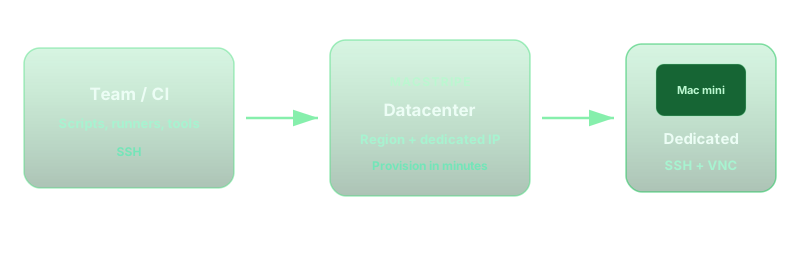
By team size and release cadence, three paths are common. The table below focuses on Flutter + iOS scenarios—not pure Android teams.
| Mode | Best for | Pros | Watch-outs |
|---|---|---|---|
| Git-triggered cloud Mac CI | Fixed release rhythm, mature scripts | Unattended, parallel branches | First-time Signing / Pod changes often need manual intervention |
| SSH + command-line builds | Shell-savvy teams wanting simplicity | Low cost, easy to automate | GUI troubleshooting needs a separate VNC session |
| VS Code Remote SSH | Teams wanting "like local" edit-and-build | Unified editor + terminal + extensions | Network latency affects save and indexing |
If you also care about store listing and release operations, read alongside the How to Publish iOS Apps on Windows: 2026 App Store Release Guide; for a native Xcode remote path, see How to Build iOS Apps on Windows in 2026.
3. Cloud Mac setup (first time ~30–60 minutes)
The steps below assume a dedicated cloud Mac + SSH; exact menus depend on your rented macOS version. After provisioning, pin a major Xcode version aligned with your team's ios/Podfile minimum deployment target.
3.1 Core toolchain
- Install Xcode (App Store or
xcode-select), then runsudo xcodebuild -license accept - Install Xcode Command Line Tools:
xcode-select --install - Install Flutter SDK (official zip or git clone); add
flutter/bintoPATH - Run
flutter doctorand install CocoaPods as prompted (sudo gem install cocoapodsor Homebrew) - (Optional) Homebrew, git, fastlane—for scripted releases
3.2 Clone the project and resolve iOS dependencies
git clone <your-repo> app && cd app
flutter pub get
cd ios && pod install --repo-update && cd ..
On Flutter projects with many plugins, first pod install often takes longer than Dart compilation. Decide as a team whether to commit ios/Pods: committing speeds CI but increases merge conflicts; not committing means pod install before every build.
3.3 Signing and Team ID
Open ios/Runner.xcworkspace in Xcode, select a Team under Signing & Capabilities, enable Automatic Signing, or import Distribution certificate and Profile. For CI, App Store Connect API Key + fastlane match is preferable—avoid binding a personal Apple ID to the cloud machine.
4. Running flutter build ios remotely
During debugging you can flutter run against Simulator on the cloud Mac (VNC needed to see the UI); for release builds, common commands are:
# Release build (produces .app, not yet exported as ipa)
flutter build ios --release --no-codesign

# For signing and ipa export, use Xcode or fastlane
# or Product → Archive in Xcode
Projects with flavors must pass --flavor and --dart-define, aligned with Schemes in ios/Runner.xcodeproj. Build output defaults to build/ios/iphoneos/.
VS Code Remote SSH essentials
- Install Remote - SSH locally; configure Host and IdentityFile in
~/.ssh/config - After installing Dart/Flutter extensions remotely, analyzer and pub get run on the cloud Mac—first index on large projects is slow
- Debugging iOS Simulator requires VNC to the cloud desktop; real-device debugging means shipping hardware to the datacenter or using a local Mac—most remote teams go straight to TestFlight internal testing
5. Compile speed: what M4 cloud Mac means vs. older Intel
Flutter iOS build time varies enormously with project size, plugin count, clean vs. incremental builds, and disk type—do not invent fixed second counts. In practice, Apple Silicon (M-series) vs. older Intel Mac mini tends to win on:
- Full
pod install: dependency resolution and native Pod compilation - First
flutter build ios: Xcode compiling Swift/ObjC bridges and plugins - Incremental builds: unified memory reduces swap; NVMe eases DerivedData IO bottlenecks
For a fair comparison, run one clean build each on the same repo, branch, and flutter --version, and record total wall-clock time for "pod install + flutter build ios." Memory guidance: 16GB works for small-to-mid Flutter projects; 24GB is steadier with many plugins or Simulator running concurrently.
6. Best practices: CocoaPods, caching, and debugging
- Lock versions: commit
Podfile.lock; after a major Flutter upgrade, runpod repo update - Cache DerivedData: keep Xcode DerivedData on persistent cloud Mac disk to shorten incremental builds (periodically clear bad caches)
- Environment variables: in CI, set
FLUTTER_ROOT,COCOAPODS_DISABLE_STATS=true, etc., to avoid interactive stalls - Logs: on build failure, check
flutter build ios -vandios/Podscompatibility first; plugin GitHub issues are a frequent answer source - Network: cloud Mac pulling Git and CocoaPods CDN is often more stable than home uplink—good fit as a dedicated build machine
7. Common mistakes (signing and remote environments)
- Assuming
--no-codesignis enough to ship: unsigned .app cannot go to TestFlight; you still need Archive + correct Profile - Creating certificates on Windows: Distribution private keys must be created in macOS Keychain; generate on cloud Mac and export per team policy
- Bundle ID mismatch:
ios/Runner.xcodeproj, App Store Connect, Firebase, and other backends must use the same ID - Missing
Info.plistpermission strings: camera, location, etc. Usage Description gaps cause review rejection—regardless of where you build - Multiple machines sharing one developer account: Provisioning Profile count and device registration have limits—centralize management
8. Region nodes: Asia vs. US/Europe teams
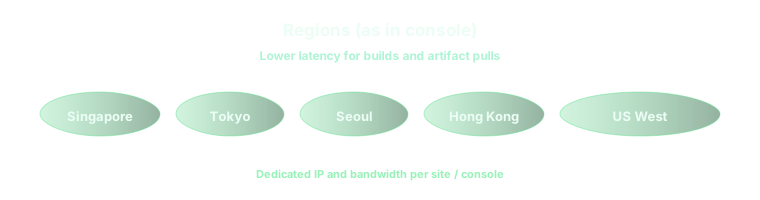
Remote Flutter development is sensitive to RTT latency: VS Code Remote saves, terminal echo, and git push all depend on distance. Rough rules:
- Team in mainland China / Hong Kong / Taiwan: prefer Asia-Pacific nodes—Singapore, Hong Kong, Tokyo, Seoul—for snappier interactive SSH/VNC
- Team in US/Europe: choose US East/West nodes for easier alignment with GitHub and App Store Connect
- CI-only, no interactive SSH: match node to code repo location to shorten
git cloneand artifact pulls
9. Boundaries: when not to rely on remote Mac alone
Remote Mac covers most Flutter iOS releases, but reserve a local Mac or longer support window when:
- Heavy native iOS plugin customization requiring frequent Swift and Xcode Instruments debugging
- You must attach a local iPhone for low-latency debugging (Bluetooth, peripherals, ARKit, etc.)
- The team has no scripting experience and changes Signing multiple times per week—pure CI troubleshooting cost can rise
- Data residency rules require confirming cloud Mac region against code hosting policy
10. Flutter iOS remote build checklist
- Cloud Mac has Xcode, Flutter, CocoaPods;
flutter doctorshows no blockers - Repo
flutter pub getandpod installsucceed - Signing Team / Profile configured; Bundle ID matches backends
flutter build ios --releasepasses (or Archive succeeds)- ipa uploaded to TestFlight; critical paths verified on real device
Info.plistpermission strings, privacy manifest, export compliance filled in
Decouple Flutter iOS builds from hardware procurement
Flutter teams need not buy a Mac just to compile iOS a few times a year. Pay-by-the-day dedicated M4 Mac mini fits the iOS build machine model: turn on for release week, run flutter build ios and TestFlight upload, then shut down—Windows/Linux daily drivers keep doing everyday development. vpszap offers physical Apple Silicon, SSH/VNC, and multi-region nodes with no long contract. Explore vpszap cloud Mac mini and run one full pod install → build → upload cycle to validate latency and disk for your project size.
