In 2026,App Store localizationandsandbox StoreKitwork rarely stay on one desk. QA needs realisticregional storefronts, finance wants receipts in the right currency, and engineers chase flakysandbox-to-productionedges. Renting adedicated cloud Mac mini M4next to the people and networks that matter beats flying hardware around. This FAQ maps that problem to six common metros —Singapore, Tokyo, Seoul, Hong Kong, US West, and US East— then sizes16GB / 256GB versus 24GB / 512GB, explains when1TB or 2TB NVMe expansionpays off, and comparesparallel executorson multiple hosts withshort-term versus mid-term rentwithout turning pricing guesses into promises Apple never made.
1. Six regions: align the Mac with humans, not with a map pin
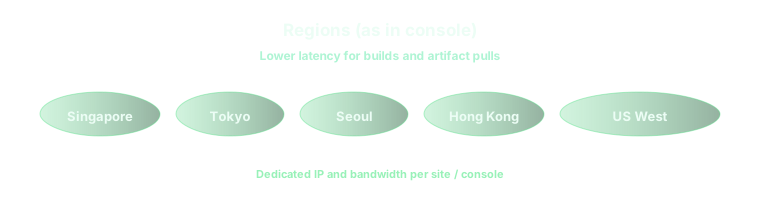
Apple's infrastructure is global, butyour signing keys, VPN, and internal billing mocksare not. Pick a cloud Mac region that minimizes round trips for the cohort that actually drivesTestFlight builds, StoreKit Configuration files, and manual sandbox purchases. Teams concentrated in Japan or Korea should tryTokyo or Seoulfirst; Southeast Asia and many India-adjacent squads gravitate toSingapore; Greater China often lands onHong Kongwhen latency and peering match their uplinks. North American release trains usually split betweenUS WestandUS Eastbased on where App Store Connect uploads, artifact storage, and Slack-heavy humans already live. Measure SSH, VNC, and a full upload pipeline from each office — marketing RTT tables are entertainment, not capacity planning.
For a deeper region-versus-spec trade-off matrix that also covers parallel pools outside the App Store context, see Learn more: 2026 Cloud Mac six-region latency, M4 tiers, and rental FAQ.
2. Mac mini M4: 16GB / 256GB versus 24GB / 512GB for localization workloads
The16GB RAM / 256GB SSDtier is enough for disciplined teams that run one Xcode, prune DerivedData aggressively, and keep sandbox tests modest. It frays when localization QA keeps multipleSimulator localesopen, parallel UI tests spawn extra processes, or you snapshot several storefront builds per day. The24GB / 512GBprofile absorbs heavier StoreKit test plans, more concurrent schemes, and longer-lived caches without turning disk hygiene into a part-time job. If you already budget time for “delete old archives,” you are flirting with the larger tier even before you add extra languages.
3. 1TB and 2TB expansion: archives, betas, and parallel Xcode stacks
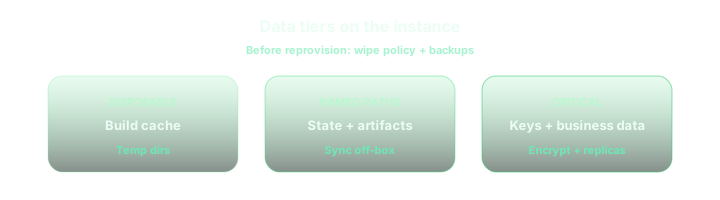
Regionalization spikes often meanmultiple Xcode betas, large.xcarchivetrees, and retained symbols for crash triage. A 256GB root volume collides with that reality quickly; 512GB lasts longer but still punishes teams that rotate several apps. Adding1TB or 2TB NVMebuys contiguous high-bandwidth space on the same machine so you stop shuffling builds to external sync tools mid-sprint. The goal is fewer “disk full” failures during the week finance and marketing are both clicking sandbox purchases.
4. Parallel executors: more Mac minis versus one wider box
Runningparallel test executors— separate self-hosted runners, Fastlane lanes, or XCTest shards — onmultiple dedicated Mac minisisolates flaky sandbox sessions, lets one host stay pinned to a stable release Xcode while another tracks betas, and mirrors how larger shops already fan out CI. The cost question is operational: more SSH hosts, more tokens to rotate, more launchd or runner upgrades. If your orchestration already spans GitHub Actions labels across regions, the same topology applies to App Store workflows; the companion FAQ walks Git wiring and follower roles across the same six metros. Learn more: GitHub Actions self-hosted macOS runners, artifacts, and six-region cloud Mac FAQ.
5. Short-term spikes versus mid-term rent
Daily or weeklyrentals fit pre-submission crunches, one-off storefront audits, or proving a region before you move the whole QA bench.Monthly or quarterlycycles reward standing environments where caches, keychains, and simulator presets survive longer than a single sprint. The expensive mistake is maxing RAM and disk for a three-day spike, then downsizing so aggressively that every renewal cold-starts Xcode downloads. Matchbilling cadenceto how long Apple IDs, sandbox testers, and internal receipts are allowed to live on disk, then adjust region and hardware together.
6. Checklist before you rent for sandbox work
- Which metro gives your QA and release engineers the bestinteractive latency and upload throughputto App Store Connect and your private registries?
- Will16GB RAMsurvive concurrent Simulator locales and UI tests, or do you already hit memory pressure on laptops?
- Do you need512GBonly, or headroom for1TB / 2TBarchives and multiple Xcode installs during localization freeze?
- Should parallel runs map tomultiple smaller Mac miniswith isolated disks, or one larger host with strict job queues?
- Does your rent window cover the wholelocalization plus regressionwindow without forcing mid-cycle reprovisioning?
On vpszap, sandbox and localization hosts stay predictable
Everything above assumes you are not sharing a hypervisor with noisy neighbors. vpszap provisionsphysical Apple Silicon Mac minimachines — dedicated CPU, RAM, and NVMe — withSSH and VNCin aboutfive minutes, acrossmulti-region low-latencynodes including Singapore, Tokyo, Seoul, Hong Kong, US West, and US East. Plans bill by theday, week, month, or quarterwithno long-term contract, so you can park a host next to your APAC QA for one release, then extend or resize for the next train without a three-year capex committee.
If you want StoreKit sandbox debugging on hardware that behaves like a real desk Mac, start from thevpszap cloud Mac mini homepageand pick the region that matches your measured traces.
