In 2026, most OpenClaw friction is not “missing features” butonboarding and permissions: the gateway and CLI disagree on versions, the workspace path differs between your laptop and the host where automation runs, or macOS privacy prompts never appear because the session is non-interactive. This FAQ walks frominstall to first successful skill run, explains howSkillsshould be treated as policy surfaces, and ends with amulti-region Mac mini M4 cloud Maclatency playbook so operators sit next to the machine that actually holds the repo and the gateway.

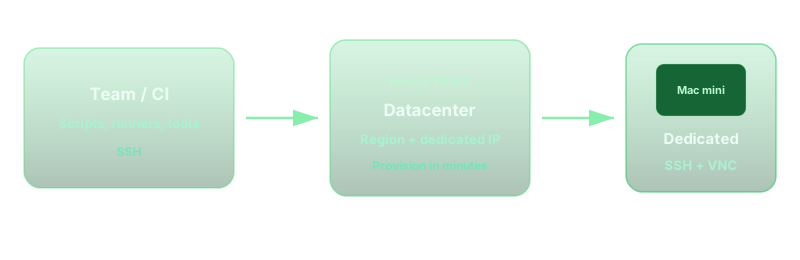
1. Baseline install: one host, one truth
Before touching Skills, alignwhereOpenClaw runs. A common split-brain pattern is an npm-global CLI on your laptop while the gateway was upgraded on the server. Run the project’s documented doctor or health command onthe same machinethat owns port 18789, then repeat from your operator shell over SSH. If versions diverge, fix the packaging path first — otherwise every skill manifest looks “broken” when the parser is simply stale. For gateway-only networking and loopback posture, pair this checklist with the dedicated FAQ onremote access boundariesin Tailscale Serve, SSH forwards, and openclaw doctor.
2. Skills are policy, not “extra plugins”
Think of Skills asallowlisted capabilitieswith explicit roots: which repositories may be read, which binaries may be invoked, and which outbound domains are in scope. Start with the smallest manifest that proves value, then widen paths deliberately. Keep secrets out of prompts; load them from a vault or per-host keychain patterns your security team already approved. Document theworkspace rootnext to every skill entry so reviewers know whether automation is touching ~/workspace, a monorepo subfolder, or a CI checkout path that only exists on the remote Mac.
3. Workspace layout and trust boundaries
Onboarding failures often trace torelative paths: scripts assume . is the repo root, but launchd or a non-login SSH session starts elsewhere. Standardize on an absolute workspace variable in your unit files or shell profile, and symlink only when you understand SIP and sandbox implications. If designers need occasional GUI approval flows, plan aVNC windowfor the prompts that will never surface over plain SSH. That is normal macOS behavior, not an OpenClaw defect.
4. Permission FAQ: what bites in production
Full Disk Access / Automation: background gateways inherit TCC context from how they were installed. If a skill touches Mail, Desktop, or Photos-like folders, expect denials until the right binary is allowlisted under System Settings → Privacy & Security.Non-interactive shells: ssh user@host 'openclaw …' skips login hooks; PATH and locale differ from Terminal.app. Source the same profile snippet you use for CI.Keychain and signing: CI-style hosts still need certificates and signing identities provisioned deliberately; Skills cannot “wish” Xcode permissions into existence.
- Same macOS minor version between dev and cloud host for reproducible skill tests
- Explicit workspace env exported for launchd and SSH sessions
- Human-in-the-loop path documented for first-time privacy prompts
- Disk headroom for model caches and build artifacts before enabling heavy skills
5. Multi-region M4 cloud Mac: cut latency, not jargon
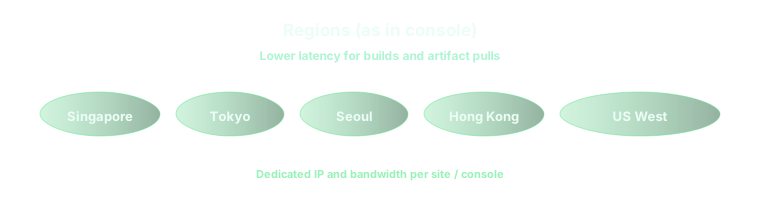
OpenClaw “feels slow” when operators in Tokyo steer a gateway in US East. MeasureRTT and TLS setupwith simple curl or mesh ping from the operator seat to the gateway host, then compare artifact pulls from your registry region. A practical pattern is to place thededicated Mac mini M4in the metro that wins on both human RTT and dependency proximity, keep the repo there, and avoid cross-ocean file sync except for backups. For a six-metro comparison of APAC versus US coasts, NVMe tiers, and parallel pools, read 2026 Cloud Mac: Six Regions vs Mac mini M4 — latency, storage, and rental FAQ. When multiple time zones share one gateway, add anamed seatand queue discipline so latency experiments are not confounded by contention — Cross-border seat rotation and parallel queues spells out that operating model.
6. Close the loop
Ship a one-page runbook: install source, workspace root, skill allowlist, privacy checklist, and which region owns the gateway. Re-run doctor after every upgrade, and snapshot disk before enabling experimental skills. When the runbook stays boring, OpenClaw stays reliable.
On vpszap cloud hardware, this playbook is easier
The workflows above assume adedicated Apple Siliconhost you control end to end. vpszap providesphysical M4 Mac minimachines — no virtualization, no noisy neighbors — with aboutfive minutesfrom order to workingSSH and VNC. Billing is flexible by the day, week, month, or quarter, withno long-term contract, and nodes acrossSingapore, Tokyo, Seoul, Hong Kong, US West, and US Eastso you can place OpenClaw next to the team that actually operates it.
If you want Skills and gateways running on the same metal your release train trusts, vpszap cloud Mac mini is a low-friction place to start.
